
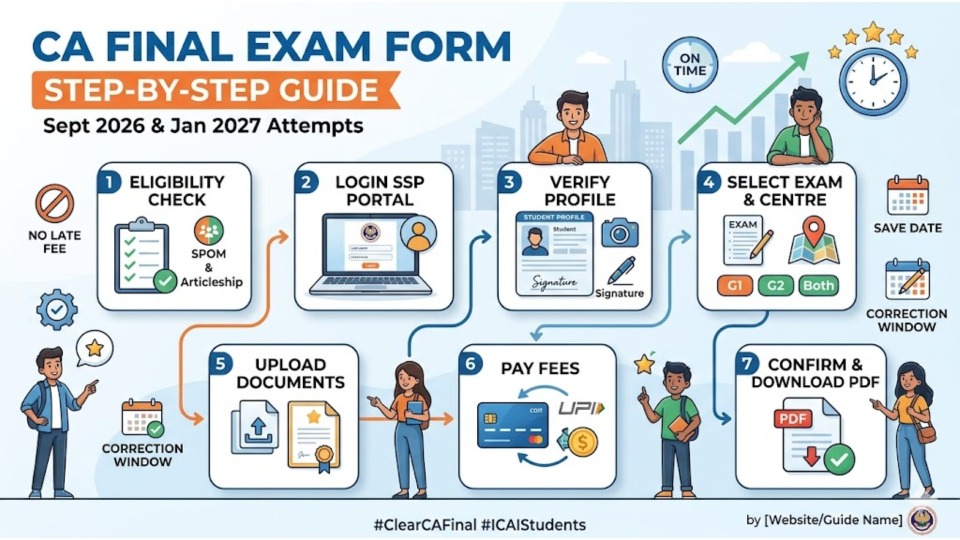
The CA Final Exam is the last and most important step in your journey to becoming a Chartered Accountant. While studying hard is your main job, filling out the CA Final Exam Form correctly is just as important.
If you are planning to appear in the September 2026 or January 2027 attempts, this guide will help you complete the process without any mistakes.
Click on any batch to view details and enrol instantly!
ICAI now conducts exams three times a year. Missing a deadline can cost you six months, so mark these dates in your calendar:
| Event | September 2026 Attempt | January 2027 Attempt |
|---|---|---|
| Form Opening Date | July 1, 2026 | November 1, 2026 |
| Last Date (Normal Fee) | July 20, 2026 | November 20, 2026 |
| Last Date (With Late Fee)Eligibility Checklist: Are You Eligible? | July 23, 2026 | November 23, 2026 |
| Correction Window | Last week of July | Last week of November |
Quick Tip: Don't wait for the last day! Fill out your form within the first week to avoid website crashes or payment issues.
Before you log in to the portal, make sure you have completed these requirements:
Go to
Once you are on the dashboard, click on 'Student Cycle' and then select the 'Exam Functions' tab. Click on the link that says 'Apply for Exam'.
Your basic details (Name, Date of Birth, etc.) will appear automatically.
Select your preferences carefully
You may need to upload a 'Certificate of Service' (signed by your Principal) if your articleship is still ongoing. Keep a scanned copy ready in PDF format.
You can pay using UPI, Net Banking, or Debit/Credit Card
After a successful payment, the portal will generate a PDF of your application. Download and save it. If the money is deducted but you don't see the PDF, wait for 24 hours before trying again.
Filling the CA Final Exam Form is the first official step toward your dream of becoming a Chartered Accountant. Follow these steps carefully, keep your documents ready, and submit your form early.If you have any questions or face any technical errors on the SSP portal, feel free to ask in the comments below!
1. Can I fill the exam form if my SPOM status is still 'Pending'?
No. Under the new scheme, clearing the Self-Paced Online Modules (SPOM) is a pre-requisite. The portal may not allow you to submit the form until your results are updated in the system.
2. What should I do if the fee is deducted but the status shows 'Failed'?
Do not panic. Wait for at least 24-48 hours for the SSP portal to update. If it still doesn't show, contact ICAI technical support. Usually, the first amount is refunded automatically if the transaction was unsuccessful.
3. Is there a way to change the exam centre after submitting the form?
Yes, you can use the 'Correction Window' provided by ICAI. It usually opens for a short period after the main form-filling window closes, allowing you to change your centre, group, or medium.
4. Do I need to send a hard copy of the exam form to ICAI?
No, the entire process is now 100% digital. Just download the PDF confirmation after successful payment and keep it safe for your own reference.
CA Vipul Dhall is a first-attempt Chartered Accountant and All India Rank 43 in CA Finals, B.Com graduate from Hindu College, University of Delhi, he brings valuable corporate experience from PwC and Bharti Airtel, blending practical industry insights with a strong passion for teaching. With 6+ years of teaching experience, his mission is to inspire students to believe that the CA dream is achievable with the right guidance and discipline.

 Launch your Graphy